
WordPress Critical Error After an Update: Safe Diagnosis
A WordPress critical error after an update usually means the updated environment encountered a fatal PHP failure. The update is an important clue, but timing alone does not prove which component is responsible. A plugin may depend on code supplied elsewhere, or the new version may require a different PHP runtime.
Start by recording the change, protecting the current site and obtaining the underlying error. Avoid updating, reinstalling and disabling several things at once: each extra change can remove evidence or introduce another incompatibility.
If the site is taking payments, you have no reliable backup or you are unsure which files belong to production, stop before changing code. Ask the host or an authorised developer to preserve the site and inspect the relevant logs.
1. Record the update before attempting recovery
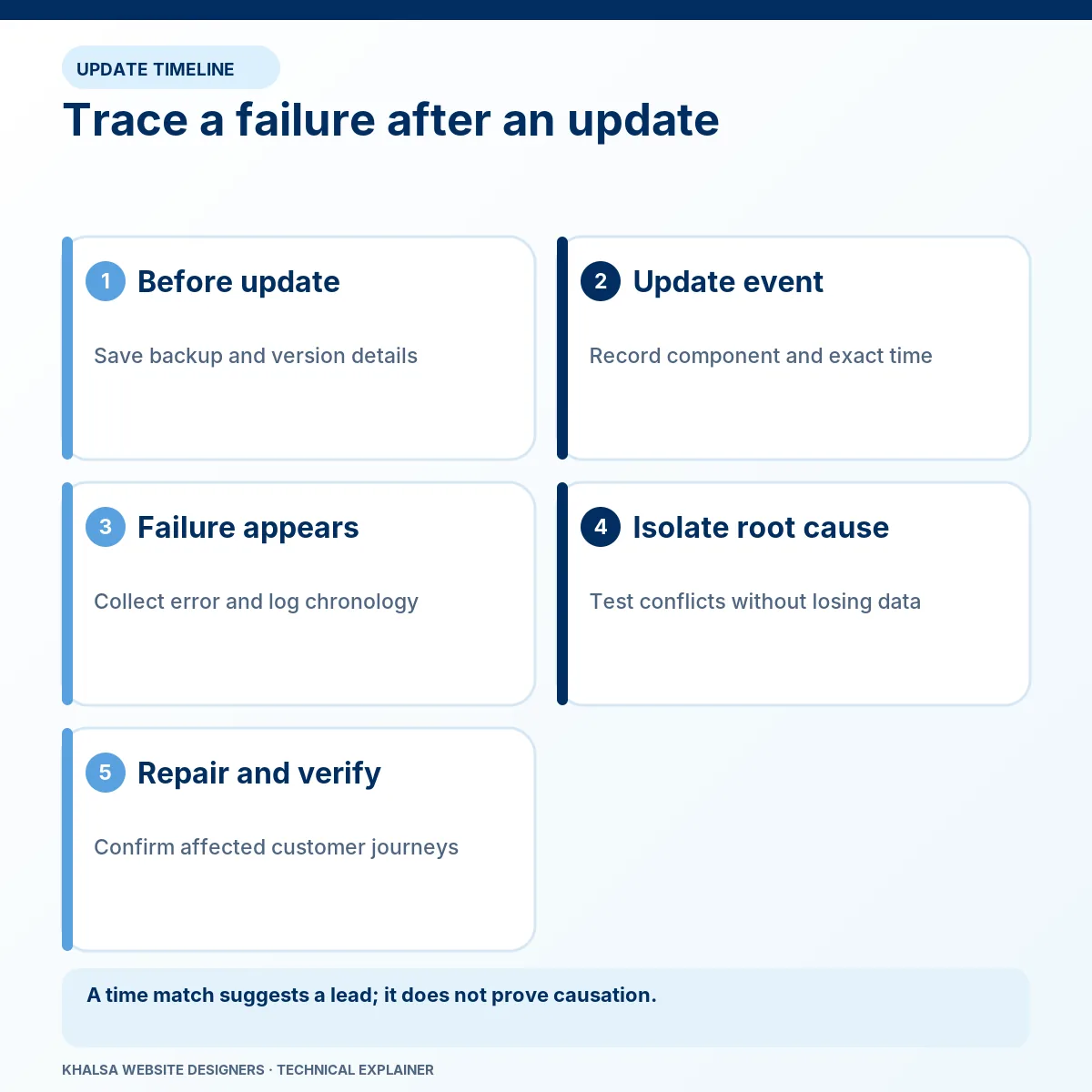
Write down the affected URL, first failure time with time zone, what was updated and whether visitors, administrators or a particular action are affected. A WordPress update, plugin update, theme change and host PHP change are different events.
Use an evidence timeline rather than an assumption:
| Event to record | Why it matters |
|---|---|
| Last known successful use of the affected action | Narrows the time window; a working homepage may not prove the action worked. |
| Component and version changed | Identifies what must be compared with the earlier state. |
| First observed failure | Helps match the request with application and host logs. |
| Other automatic or manual changes | Reveals changes that may have happened at the same time. |
| Backup time and current business activity | Determines what could be lost during rollback. |
Do not delete the update notification or recovery email. Keep the original private; share only redacted technical details through the agreed support channel.
2. Determine what is still working
Check the public page, the affected action and wp-admin separately. Use read-only observation first. If a critical-error screen appears only when opening a particular editor panel, that is different from every request failing.
Record the exact message and HTTP response if your tools expose it. A white screen, HTTP 500 and WordPress's critical-error notice can overlap, but they are not interchangeable diagnoses. A background task can also fail while normal page loads succeed.
A warning or deprecation notice does not automatically mean PHP execution stopped. It still deserves attention if it exposes paths, affects output or signals an unsupported interface. The actual error level and resulting behaviour matter.
3. Check for a genuine Recovery Mode email
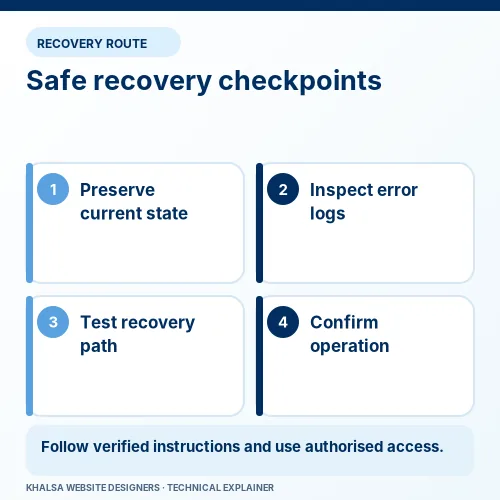
WordPress Recovery Mode may provide an administrator with temporary access after certain fatal failures. It is not available for every error or background operation.
Verify that the email concerns your actual site. Treat its recovery URL as sensitive access information; do not post or forward it into a public support thread. If you use the link, inspect the reported component and error before deciding on a change.
Recovery Mode is an investigation aid. A paused component in that session is not proof that the public website is repaired. The underlying defect and normal visitor experience still need checking.
If no email arrives
Check the configured administrator mailbox and spam handling if you can do so safely. The failure can occur before the site's normal mail integration loads, and delivery itself can fail. Ask the host for the PHP error corresponding to the failed request rather than repeatedly waiting for an email that may never arrive.
Do not invent or guess a recovery token. If WordPress cannot start, the authorised host administrator may need to inspect files and logs outside wp-admin.
4. Read the underlying error as evidence
Useful details include the error type, message, relevant file, line, call sequence and timestamp. Redact private paths, account names, tokens and customer data before sharing them.
Here are fictional message patterns to explain the distinction; they are not logs from a client or evidence of an executed test.
| Illustrative pattern | Plausible investigation | Conclusion to avoid |
|---|---|---|
| A package requires PHP 8.3 or later; the web runtime is 8.2 | Verify the package constraint, actual web runtime and compatibility of the remaining stack. | “Delete the platform check and the code will work.” |
| A function is undefined | Check whether the expected dependency exists and loads before the caller. | “The file naming the call is necessarily the sole cause.” |
| A method receives an unexpected value or type | Trace the input and the versions of the communicating components. | “Any recent plugin can be removed without side effects.” |
| Allowed memory is exhausted | Identify the request, workload and relevant limit. | “Raising memory indefinitely fixes the reason it grew.” |
A stack trace provides a sequence of calls. It can reveal an interaction between components rather than one self-contained fault. Correlate it with the actual request; an old fatal in the log may describe a different incident.
5. Let an authorised developer isolate the cause safely
Before changing configuration or code, preserve the required files and database state. For higher-risk work, reproduce the failure in an isolated staging copy. Ensure that copy cannot trigger live charges, customer emails, bookings or fulfilment.
The developer should test a specific hypothesis. For example, compare the old and new extension under the same relevant runtime and dependent components. A plugin-combination test is only useful if it retains the action that originally failed.
Keep diagnostic output private
WordPress documents its debugging controls. WP_DEBUG enables diagnostic behaviour; WP_DEBUG_LOG controls logging; WP_DEBUG_DISPLAY controls display. Use actual boolean values, and do not duplicate existing definitions in configuration.
Turning off display does not make a log file private. The administrator must choose a protected destination, appropriate permissions, limited retention and a way to check that the log is not publicly downloadable. Production logging, if necessary, should be tightly controlled and removed or reduced afterwards.
For a nontechnical owner, providing a timestamp and asking the host for the matching error is safer than editing wp-config.php from a general recipe.
Deactivation is a controlled test, not a harmless reset
Removing a plugin from execution can interrupt payments, bookings, security checks and scheduled work. Deleting it can have additional data consequences. A developer should choose a scoped test, record the state and know how to reverse it.
When the administrator area is unavailable, manual file or command-line intervention may be possible for an authorised administrator. The method must fit the installation, including must-use plugins, custom loading and multisite where relevant. Do not rename arbitrary directories without identifying their role.
6. Choose between compatibility correction and rollback
If a package requires a newer runtime, compare that requirement with WordPress, the theme, the other plugins and required PHP extensions. The version used by a command-line process can differ from the web server's PHP version.
| Option | What must be established first |
|---|---|
| Move to a supported compatible PHP runtime | The complete stack and business journeys work under that environment. |
| Use a compatible extension release | The release is trustworthy and suitable, and any database change can be handled safely. |
| Replace or repair the dependency | Required functionality and stored data can be retained within a maintainable design. |
| Restore a previous state | The backup is usable and the effect on newer records is understood. |
Composer's runtime platform-check documentation explains why runtime requirements cannot be solved by editing their warning away. Check the PHP support schedule when selecting a target; an old unsupported runtime is not a durable compatibility plan.
A plugin rollback may not reverse its database upgrade. Restoring files alone can leave old code reading new structures, while restoring a full database can remove fresh orders or enquiries. Establish that relationship before treating rollback as the lowest-risk option.
7. Verify the recovery under normal conditions
Exit the special diagnostic state as appropriate and retest the original action. Check the relevant public pages, administrator screens, forms, integrations and store journey. Include background work if that was involved.
Review fresh logs after the same test. Record the versions, correction and remaining limitations. A recovery that works only with an essential feature disabled is a temporary operating state requiring a separate plan.
The final note should distinguish the confirmed cause from contributing conditions. This makes the next update easier to assess and avoids blaming a plugin based solely on the original email.
When to stop and get help
Escalate if the website processes live transactions, no trustworthy backup exists, file ownership or access is unclear, an update changed database structures or the error remains unexplained after a controlled test. Suspected compromise needs its own assessment rather than ordinary update troubleshooting.
For a developer-led investigation, use WordPress error fixing. If the error began during a host move or restore, use WordPress migration recovery so the environment and recent data are assessed together.
Common follow-up questions
Is the last updated plugin always responsible?
No. The update can reveal another incompatibility or alter an interaction. Treat timing as a clue and use the matching error plus a controlled comparison to establish causation.
Should I reinstall WordPress immediately?
Only when evidence supports replacing the relevant files and a safe procedure is agreed. Reinstallation does not automatically correct custom code, dependency constraints or database state.
Can I simply increase the memory limit?
Only after identifying a genuine limit and whether the hosting plan can support the change. A runaway process or expensive query needs investigation; a larger limit may postpone its failure.
What information should I send a repair specialist?
Send the affected URL, failed action, timeline, changed versions if known, backup status and a redacted error excerpt. Do not send the recovery URL, passwords or a full database. Contact KWD with the update timeline to agree the next investigation step.
If the site is still failing, use the WhatsApp icon to tell KWD which update preceded the error, which pages are inaccessible and whether a backup exists. Send a redacted error summary rather than administrator credentials. Email enquiries can go through the Contact page.


