
WordPress Contact Form and Email Delivery Fixes
A website enquiry can fail before the form submits, after WordPress creates its notification or inside the recipient's mail system. A success message on the page does not prove that the business received the message.
Khalsa Website Designers investigates WordPress form errors, missing enquiry notifications, SMTP or email API failures and sender authentication problems. The goal is to trace an agreed test from the visitor's action to the intended destination and identify where the evidence stops.
Ask why your website enquiries are not arriving. Include the form URL, the confirmation or error shown and when you last ran a test. If your form is unreliable, use one of the alternative contact channels listed on that page.
If enquiries are missing from a business inbox abroad, mention the form URL, the receiving email platform (such as Google Workspace or Microsoft 365), the domain's mail provider and an approximate test time. Use the page's WhatsApp icon for an initial discussion or the contact form for email. Share redacted test details, not real customer messages or account passwords.
Is the form failing, or is its email missing?
The distinction changes the investigation. Installing an SMTP plugin cannot repair a button that never sends a request, and correcting a browser script cannot release a message held in recipient quarantine.
| What happens | The first evidence to collect |
|---|---|
| The button does nothing | Validation messages, browser errors and whether a request leaves the page. |
| Submission is rejected | The form's actual response, anti-spam outcome and server evidence. |
| A success message appears, but no notification arrives | The identified test time, mail-generation record and transport response. |
| Notifications arrive in spam | Sender configuration, authentication results, headers and recipient filtering. |
| One mailbox receives the message and another does not | Compare the same test's provider events and recipient routing. |
| Email arrives but the CRM has no lead | The separate integration request, response and record-matching behaviour. |
Keep a unique, harmless label for each controlled test. It helps connect the form event, notification and provider log without exposing a genuine visitor's message.
Follow the enquiry through five separate checkpoints
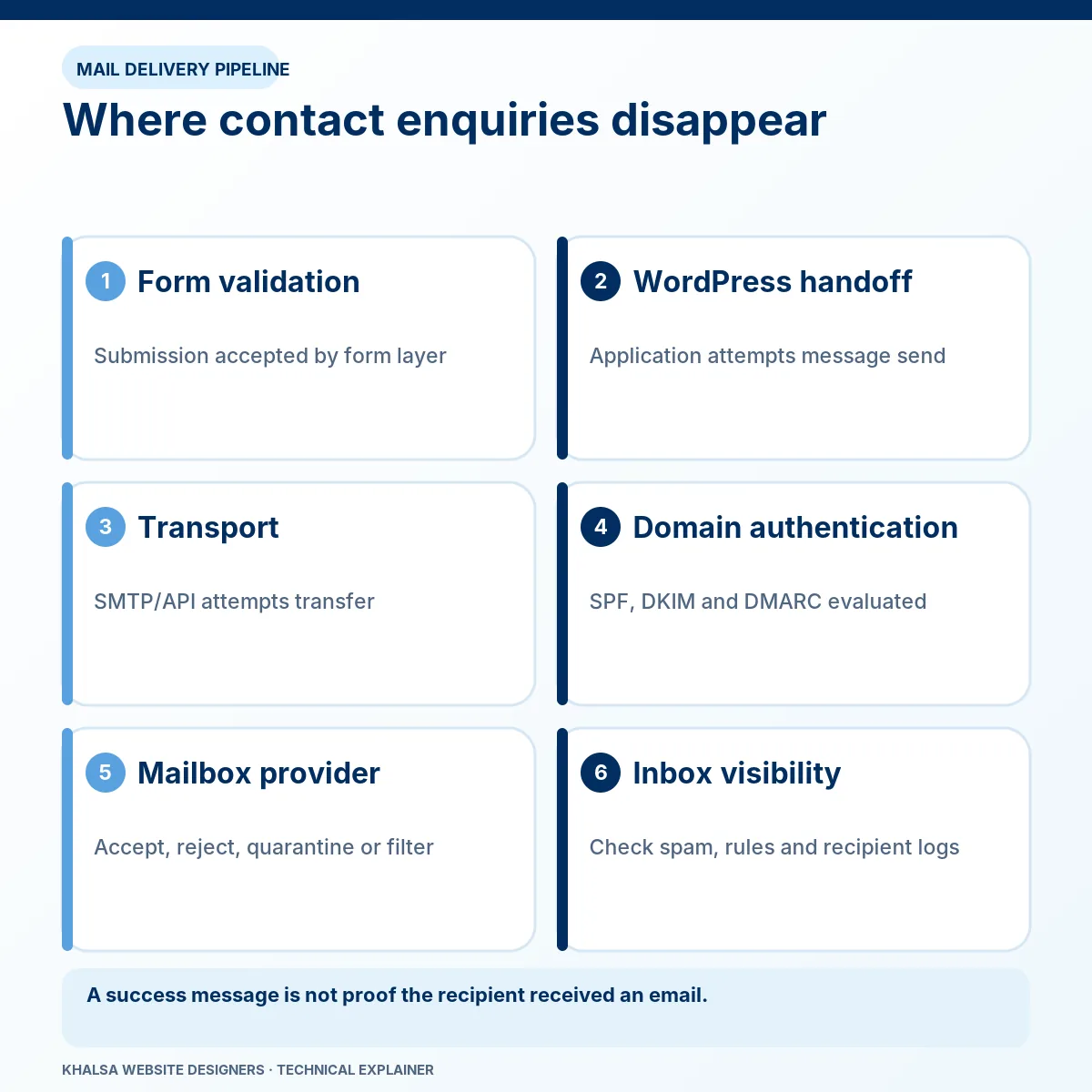
1. Validation and submission
Required fields, consent controls, file limits, JavaScript, anti-spam checks and security rules can stop a request. The test needs to reproduce the affected device, form and input conditions. Removing protection permanently can replace lost leads with spam and abuse.
2. WordPress processing and notification creation
The form may save a submission, create an email, call a customer relationship management system or do several of these. Confirm what is actually configured. A saved record does not prove an email was generated, and an email record does not prove the form stored the original submission.
The WordPress wp_mail reference explicitly distinguishes a successful function result from the user receiving the email. Custom hooks and transport plugins can also change the processing path.
3. Sending transport
Email can leave through the web host, an authenticated SMTP server or a provider API. The investigation checks the intended route, provider response, credentials or authorisation, permitted sender identities and any queue or suppression state.
An authentication failure needs different work from a provider accepting the message and later reporting a bounce. A test-email button that works is useful, but it may use different headers or routing from the failing form.
4. Recipient handling
The recipient server may reject, quarantine, redirect or place the message in spam. Mailbox rules, forwarding, aliases and storage limits can matter. A provider's delivered event commonly refers to acceptance by a recipient mail server; the actual mailbox location may still require a separate check.
5. Lead handling after receipt
A working inbox does not establish that an automation or CRM created the expected record. Where that integration is in scope, confirm field mapping, consent handling, duplicate prevention and the receiving system's response. Replaying a request carelessly can create duplicate leads or repeat customer notifications.
Contact Form 7, Elementor and other form implementations
Form settings need to match the installed product and its current version. In Contact Form 7, recipient fields, mail tags, sender headers and additional mail templates affect the notification. An Elementor form may have several actions after submission, with one succeeding while another fails.
The investigation checks the actual form instance, including copies embedded in popups, translated pages or shared templates. Editing one form does not necessarily change the version customers are using elsewhere.
For the precise symptom where Contact Form 7 reports success without a received email, use the sent-but-no-email guide. That guide covers its settings and evidence sequence in more detail.
Sender identity, SMTP and domain authentication
The visible From address should be a sender the business is authorised to use. The visitor's email can normally be used in a validated Reply-To field, allowing a direct reply without pretending the website controls the visitor's domain.
SMTP or API transport provides a sending route; it does not by itself establish correct sender authentication or inbox placement. Domain and provider settings must agree.
| Mechanism | What it helps establish | What it does not establish |
|---|---|---|
| SPF | Whether the sending server is authorised for the envelope-sender domain being checked. | That the visible From identity is aligned or that the message will reach an inbox. |
| DKIM | Whether a domain's signature validates for the signed message content and headers. | That the message is wanted, truthful or guaranteed delivery. |
| DMARC | Whether a passing SPF or DKIM identity aligns with the visible From domain, under its policy. | That every sender and forwarding route is correctly configured. |
DNS changes should account for all legitimate sending services on the domain. Replacing existing records with an isolated copy-and-paste example can break business mail elsewhere. Authentication policy should be changed with the domain owner's approval and an understanding of the active senders.
Gmail's sender requirements distinguish ordinary senders from bulk senders. The appropriate requirements depend on the sending pattern and recipient service; not every missing enquiry is a bulk-email compliance issue.
Can missing past enquiries be recovered?
Only if a usable record exists. Check whether the form stored submissions, whether the sending provider retained the relevant message or event, and whether another authorised integration received it. Logs may contain only delivery metadata rather than the visitor's full message.
Contact Form 7 does not store submissions by default, as its Flamingo documentation explains. Adding storage now does not reconstruct earlier messages. Any new retention must be limited, protected and reflected in the website's privacy arrangements.
The repair report should say which historical records were recovered, which were unavailable and which enquiries cannot be reconstructed. Avoid resending old messages in bulk without checking consent, duplication and business context.
How delivery repairs should be verified
A useful test includes the real public form, a unique synthetic message label, the submission response, the provider event and confirmation at an agreed recipient. Where practical, compare controlled recipient accounts on more than one mail service.
Test the form on mobile, its validation errors, legitimate anti-spam handling and any relevant attachment or integration path. Use only harmless test data and agreed recipient accounts. A staging test must not notify real customers or synchronise into live sales workflows without permission.
The handover should identify the changed settings, observed outcomes, remaining provider restrictions and whether monitoring is part of the agreement. A scheduled end-to-end test can be useful where the business depends heavily on enquiries, but ongoing monitoring is a separately agreed responsibility.
Questions about missing website emails
Will an SMTP plugin fix every case?
No. It may address an unsuitable sending route, but it cannot fix every validation failure, recipient rule, blocked integration or incorrect mail template. Test the route responsible for the actual missing message.
Why do messages reach one account but not another?
Recipient systems apply different rules. Compare provider events, destination addresses, filtering and headers for a controlled test. Success at one destination is evidence about that route, not a general deliverability percentage.
Can spam protection stay enabled?
The aim is to preserve appropriate protection while identifying false positives or integration failures. Any temporary isolation test needs a controlled environment or a tightly agreed production window, followed by restoration and retesting.
Does a received order email prove a WooCommerce payment succeeded?
No. Email is a notification, not the financial record. If payment and order state disagree, use WooCommerce checkout and payment investigation before changing fulfilment or requesting another payment.
Make the next test traceable
Tell us the exact form URL, form product if known, visible result, intended recipient domain, first occurrence and recent changes. State whether submissions are stored and whether all notifications fail or only some. Do not paste visitor messages, mailbox passwords, SMTP secrets or private headers into the general enquiry.
Request form and email delivery diagnosis. If the failure affects more than forms, the website repair hub explains the other investigation routes.


