
Website Repair Services and Remote WordPress Troubleshooting
A broken website needs an explanation you can act on. It may be unavailable, losing enquiries, failing at checkout or working differently for different visitors. The visible error is the starting point; it does not always identify the component that needs repair.
Khalsa Website Designers investigates problems on existing WordPress and WooCommerce websites, including sites built by another developer. The work starts by identifying the affected journey, protecting the current data and agreeing what can be investigated safely. Repairs, custom code changes and further work are scoped around the findings.
Request a website problem assessment. Send the website address, what has stopped working and when you first noticed it. Leave passwords and private customer information out of the enquiry.
Prefer WhatsApp? Use the existing WhatsApp chat icon on this page to discuss the problem directly with Daljit Singh. Include your website URL, the symptom and your country or time zone. Do not send passwords, card information or customer records in the initial message; the contact form is also available.
Choose the problem closest to yours
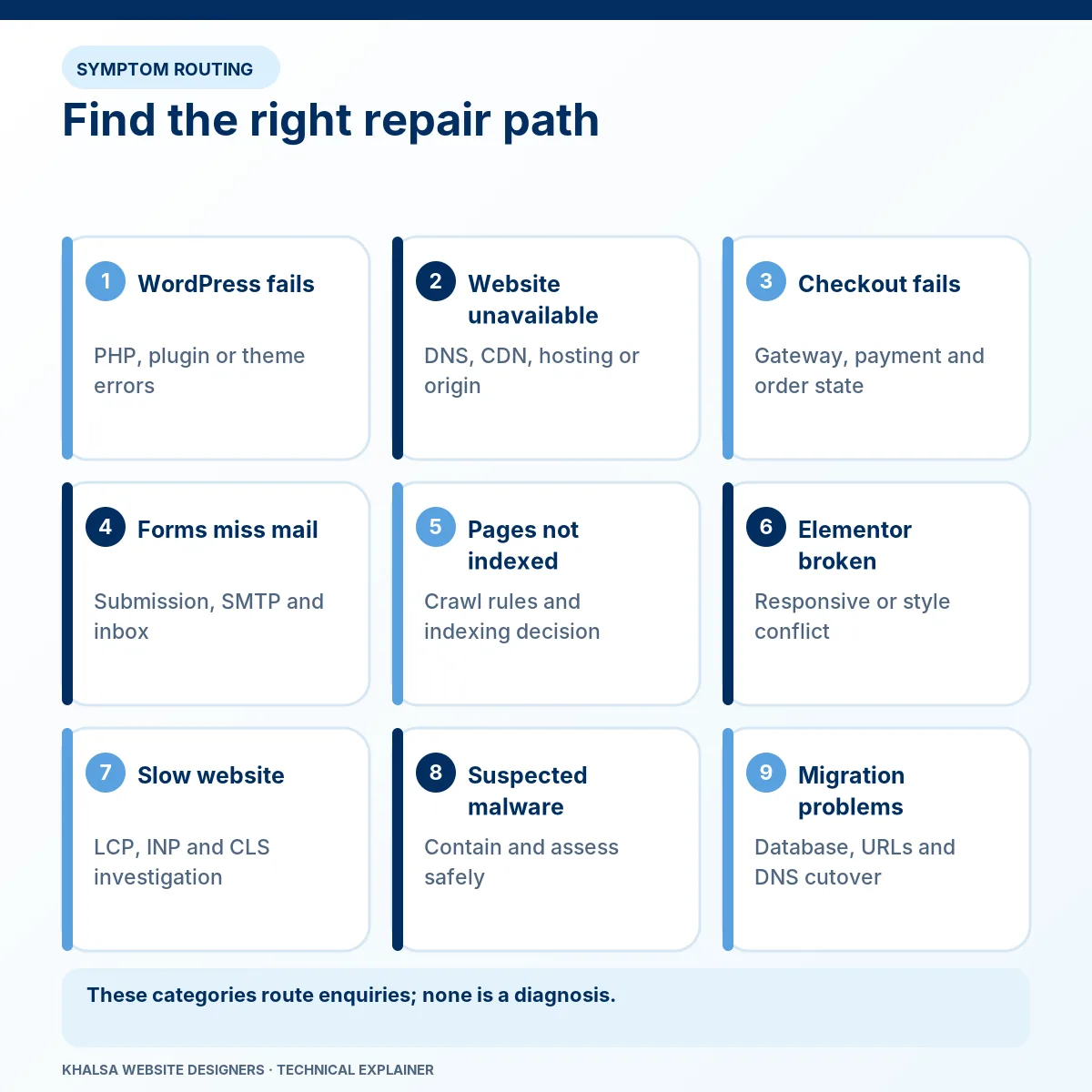
You do not need to diagnose the fault before asking for help. Use the symptom below to find the most relevant service. More than one category may be involved.
| What you see | The investigation it usually needs |
|---|---|
| A critical error, white screen or failure inside WordPress | WordPress error fixing: PHP, plugin, theme and custom code investigation. |
| The domain will not open, or visitors see connection and server errors | Website down recovery: identify the failing network, hosting or application layer. |
| Customers cannot finish checkout, or payment and order records disagree | WooCommerce checkout and payment fixes: investigate the purchase flow without risking duplicate charges. |
| A form fails, or an enquiry never reaches the expected inbox | Contact form and email delivery fixes: follow the message from submission to recipient. |
| Important pages unexpectedly disappear from Google or show indexing problems | Technical SEO and indexing fixes: separate access and configuration faults from Google's indexing decisions. |
| Elementor pages break on mobile, lose styling or show the wrong template | Elementor website layout fixes: investigate styles, responsive behaviour and interactions. |
| Pages load slowly, respond late or shift while being used | Website speed and Core Web Vitals work: measure the bottleneck before changing the site. |
| Suspicious redirects, unknown administrators or a security notice appear | Preserve the warning and contact your host. Security incidents need a separately agreed scope and an appropriate specialist. Read our WordPress malware assessment and recovery guidance before requesting assistance; a standard repair request does not promise malware clearance. |
| Problems began after a move, deployment or backup restore | WordPress migration recovery: check the new environment and protect changes made since the move. |
If you are unsure which applies, describe what a customer is trying to do and what happens instead. That is usually more useful than choosing an error category by guesswork.
When the usual fixes have already failed
Installing another plugin, clearing every cache or changing several settings at once can hide the original fault. It can also make a problem harder to reproduce. Complex repairs need a testable explanation of how the failure occurs.
Follow the failing journey
Consider a booking form that appears broken. A browser script might prevent submission; a server error might interrupt processing; an external booking API might reject the request; or the booking might succeed while its email notification fails. Each possibility needs different evidence and a different acceptance test.
The investigation follows the request through the relevant components. A useful finding identifies the observation, the suspected cause, the test that supports it and any uncertainty that remains. The last component to display an error is not automatically the component that caused it.
Investigate custom functionality in context
Custom plugins, child themes, checkout hooks and third-party integrations can be part of the problem or part of the correct solution. Their purpose and dependencies need to be understood before they are removed or rewritten. KWD's repair scope can include code investigation and a targeted custom change where justified; building a new feature is quoted as separate development when it expands the original requirement.
Vendor files should not become a collection of undocumented patches. A maintainable repair should explain where the change belongs, what happens during future updates and which tests should be repeated.
Repair, replace or rebuild?
A repair is worth considering when the website still meets the business's needs and the fault can be isolated. Existing content, page addresses, design assets and integrations may be retained, subject to the condition of the site and the agreed work.
Replacement may be more sensible when a critical extension is abandoned, the architecture repeatedly fails or the required behaviour cannot be supported safely. A rebuild can be appropriate when several foundations need replacing together. That decision should follow an assessment of risk, ongoing cost and business requirements.
The aim is to choose a durable outcome. A workaround that restores access today may still need a separate permanent remedy, with its limitation clearly recorded.
How remote diagnosis and repair work
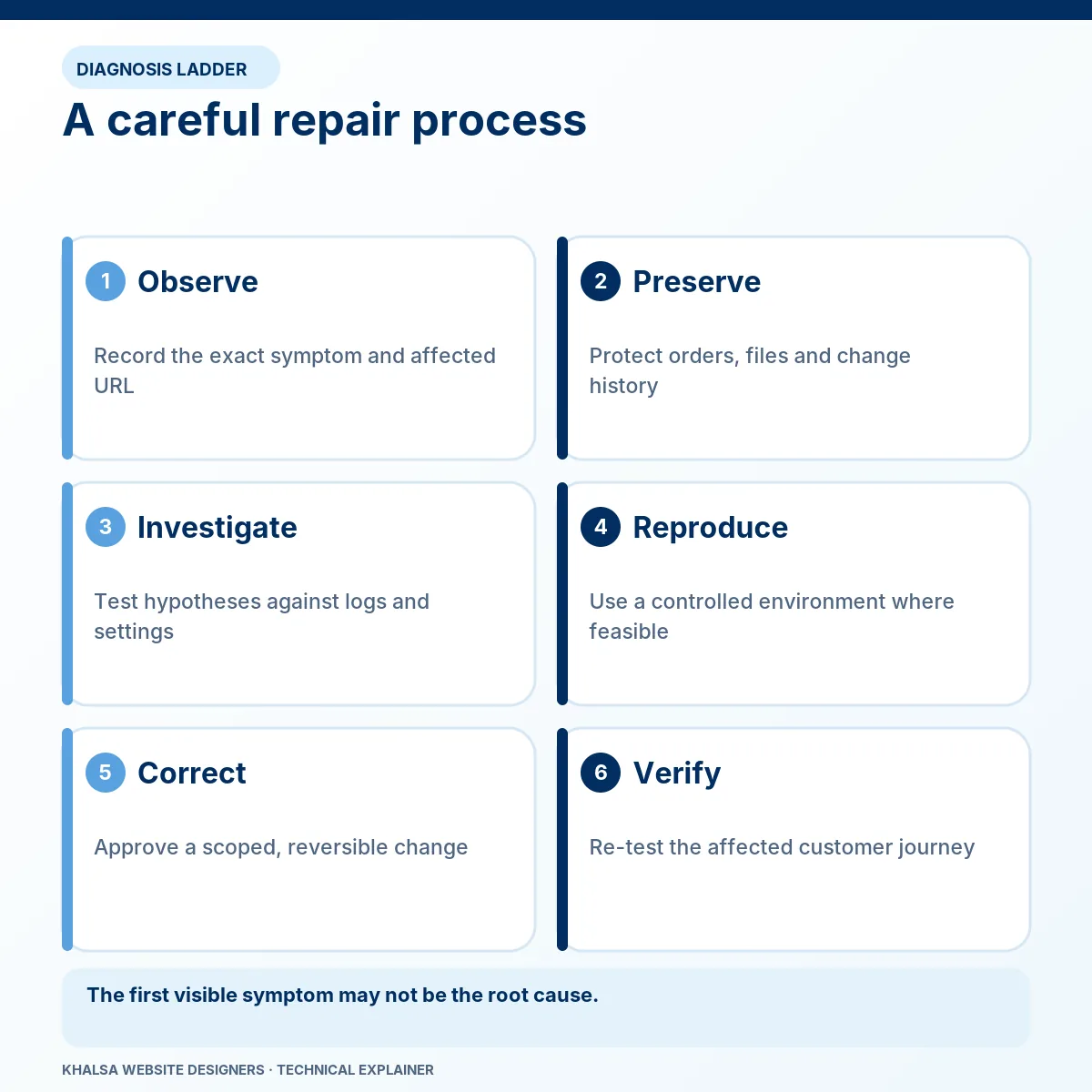
1. Define the problem and its impact
Start with the affected URLs, the task that fails, the first known occurrence and any recent update, migration or configuration change. Clarify whether the issue affects all visitors, a specific device, logged-in users or one transaction type.
2. Agree the investigation and access
Initial public checks can show visible symptoms. They cannot expose every server log, database condition or account restriction. If privileged access is necessary, the owner or authorised administrator must approve it through an agreed secure method. Use the least access required and remove temporary access when the work is finished.
3. Protect the current state
The backup and rollback plan must match the website. A store receiving orders needs different precautions from a static brochure site. Where practical, reproduce higher-risk changes on a separate testing copy. A backup timestamp alone is insufficient if nobody knows what it contains or how it would be restored.
4. Test the explanation and agree the remedy
Changes should follow evidence. The proposed work may involve configuration, a compatibility correction, custom code, a vendor escalation or a controlled restoration. Diagnosis can identify work that requires a separate quotation; agreement to investigate is not unlimited authorisation to change the site.
5. Verify and hand over
The handover should record what changed, which checks passed, what remains untested and any actions still required from the host or another supplier. A website that opens again still needs its relevant business journeys checked.
What counts as a successful repair?
Acceptance depends on the original fault. Agree the relevant checks before work starts.
| Affected journey | Evidence to request at handover |
|---|---|
| A page or administrator area would not open | The same route works under the previously failing conditions, with relevant logs reviewed. |
| Enquiries were missing | An identified test submission can be traced to the agreed destination; storage and delivery limitations are stated. |
| Checkout was failing | The agreed purchase scenarios pass, with payment and order records reconciled. |
| Mobile navigation or layout was broken | The affected viewports and interactions have been retested with the same content. |
| Search access was misconfigured | The response, directives and canonical signals are corrected; subsequent Google indexing remains a separate outcome. |
Not every row belongs in every repair. Testing should cover the change's dependencies as well as the original symptom, without pretending that every possible action on the website has been audited.
A Punjab-based service for owners overseas
Your family or business may have roots in Jalandhar, Ludhiana, Amritsar, Patiala or another Punjab city. Our Punjab service-area and city guide explains that regional connection. These links are not claims of separate branches, and remote website support is not limited by hometown.
Khalsa Website Designers is based in Kartarpur, Punjab, India. Remote work allows overseas website owners, including Punjabi business owners in Canada, the UK, Australia, New Zealand, the United States and Europe, to discuss a repair without handing over control of their business accounts.
Include your country and time zone when enquiring. Availability, communication arrangements, quotation currency and any third-party charges need to be agreed for the particular job. A remote service does not mean KWD has an office in your country or offers continuous emergency cover.
You can review the business background before making contact. Existing website management and access plans describe a different arrangement from a new repair request for an externally hosted site; confirm the applicable scope rather than assuming maintenance is included.
Questions before requesting help
Can you work on a website another agency built?
An existing site can be assessed if its owner can authorise access and provide the necessary rights to its code and services. Proprietary platforms, missing licences or restricted hosting may limit the available remedies. Keep the previous developer's documentation if you have it.
Can you diagnose everything from a screenshot?
A screenshot can identify the visible symptom and help prioritise the next check. It usually cannot establish a server-side cause, prove a payment state or reveal whether an email reached its recipient. Further evidence may be needed before quoting the repair itself.
What determines the quotation?
Relevant factors include reproducibility, access, custom code, the number of affected systems, safe test arrangements and the consequences of a rollback. Agree any diagnostic charge, implementation cost and exclusions before the corresponding work begins. No fixed repair price is implied by this page.
What if hosting or domain access is unavailable?
Public checks can still help narrow the fault, but restricted actions require the account owner or provider. Account recovery and ownership disputes belong with the relevant provider. A developer cannot legitimately bypass that process.
Can the same issue return?
It can, particularly if an external service changes, an unsupported component remains or later updates introduce another incompatibility. The repair summary should distinguish the resolved defect from remaining dependencies and recommend specific follow-up checks.
Describe the problem in one message
Send the website URL, the action that fails, the error text, when it began and anything changed shortly beforehand. Add your country, time zone and the business impact. If useful, attach a redacted screenshot through an agreed channel.
Do not send passwords, recovery links, payment information, database exports or private visitor messages in the general contact form. Secure access can be arranged after the need and scope are understood.


